Short answers about Windows Sandbox, Build My Sandbox, dependencies, host sharing and the optional fixes.
ABOUT BUILD MY SANDBOX
Made for fun. Useful is a nice bonus.
🏖️
Why does Build My Sandbox exist?
Mostly because it was fun to build. Build My Sandbox started as a vibe-coded side project to play with Windows Sandbox, experiment with some useful options and put this lightweight Windows feature a little more in the spotlight.
If it saves you a few minutes, helps you test something faster or gives you ideas for your own sandbox, even better. Either way: have fun with it.
GETTING STARTED
What you need and how the builder works
Start here if you are new to Windows Sandbox or want to know what Build My Sandbox actually generates.
🏖️
What is Windows Sandbox?
Windows Sandbox is a lightweight, isolated and disposable Windows environment. Software, files and state inside it are discarded when you close the Sandbox.
You need a supported Windows edition such as Pro, Enterprise or Education, hardware virtualization enabled and the Windows Sandbox feature installed. Microsoft lists at least 4 GB RAM, 1 GB free disk space and two CPU cores as the minimums, with more recommended for a smoother experience.
Pick the tools you want, adjust the Sandbox settings and Build My Sandbox generates the .wsb configuration and PowerShell bootstrap directly in your browser. You can inspect both before downloading the .WSB or the complete bundle.
🧩
Why are some tools added automatically?
Some applications need another component to run. Those components are dependencies. CMTrace Open, for example, requires Microsoft Edge WebView2 Runtime, so WebView2 is added automatically rather than being selectable as a normal tool.
🌐
Why is networking required?
Build My Sandbox downloads the selected tools when the Sandbox starts, so the generated configuration keeps networking enabled. The builder therefore treats networking as a required setting instead of an optional switch.
📂
Can I access my host Downloads folder?
Yes. Enable Map host Downloads. Build My Sandbox maps your host Downloads folder into Windows Sandbox. The mapping is read-only by default, and write access is a separate opt-in.
Only enable write access when you actually need files created in the Sandbox to be written back to the host.
🎨
What is the provisioning window?
Generated Sandboxes open a small status window while provisioning runs. Each selected tool and optional fix shows Pending, Installing, Ready or Failed, so you can immediately see what is happening.
🧰
What is the Build My Sandbox Toolbox?
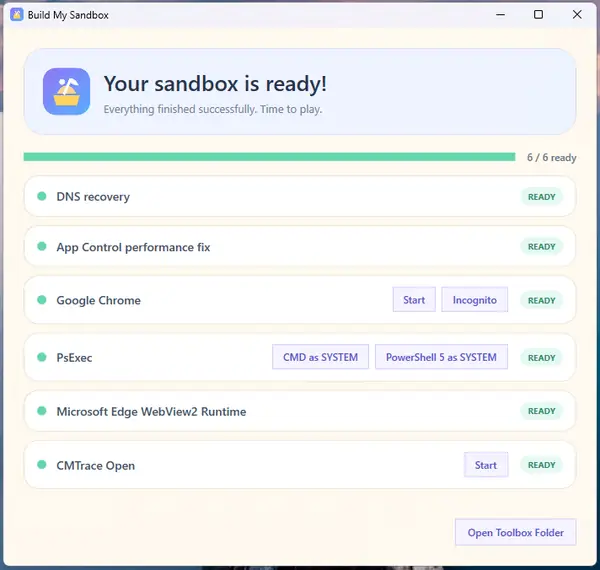
The provisioning window becomes your Toolbox once the sandbox is ready. It keeps the final status of every selected tool and optional fix visible and gives you direct launch actions for tools where that is useful.
Actions are intentionally contextual. A normal application can get a simple Start button, browsers can expose useful launch modes and tools such as PsExec can provide SYSTEM shortcuts. Dependencies and runtimes such as Microsoft Edge WebView2 Runtime are shown for transparency, but do not get a launch button when there is nothing useful to start.
Live provisioning statusReady / Failed feedbackDirect tool actionsContext-aware SYSTEM actionsDependencies stay visible
If a provisioning step fails, the Toolbox keeps going with the remaining items and surfaces the first useful failure message at the top. Failed applications get a Retry action so you can rerun that provisioning step without rebuilding the whole Sandbox. You can reopen the Toolbox later using the Build My Sandbox Toolbox shortcut on the Sandbox desktop.
The Toolbox after a successful provisioning run.
➕
Can I request another tool?
Yes. Use Request a tool below the Toy Box search field. It opens a GitHub issue form. Requests are reviewed before anything is added to the catalog.
The optional fixes are targeted workarounds. They are off by default and only run when you explicitly enable them.
🩹
What are the optional fixes?
They are small workarounds for specific problems that can occur in some Windows Sandbox environments. They are not general recommendations and should only be enabled when the matching issue is actually present.
🧰
What happens if one tool fails?
Provisioning isolates installation steps. A failed item is shown as Failed while the remaining tools continue. You can inspect the generated PowerShell before launch to see exactly what will run.
🌐
DNS recovery
Use this when: the Sandbox has IP connectivity but DNS resolution is broken and downloads fail.
The fix checks whether www.microsoft.com resolves. If DNS is broken, Build My Sandbox first tries the Windows networking PowerShell cmdlets to set 8.8.8.8. If those cmdlets fail, it falls back to netsh, then waits until name resolution works before provisioning continues.
Azure's 168.63.129.16 address is not a general public DNS resolver; it is intended for Azure virtual-network platform services, so Build My Sandbox does not use it here.
⚡
App Control performance fix
Use this when: installations inside Windows Sandbox become extremely slow while App Control / Smart App Control is active.
The fix sets VerifiedAndReputablePolicyState to 0 inside the disposable Sandbox and calls CiTool.exe -r to refresh Code Integrity before provisioning applications.
Sandbox only. This deliberately reduces an application-control protection inside the disposable test environment. Do not copy this workaround to normal managed endpoints.
🛠️
What if Windows Sandbox itself does not start?
Build My Sandbox can generate the configuration, but Windows Sandbox still has to work correctly on the host. Check that the Windows Sandbox feature is installed, virtualization is available and no policy is blocking the required settings. Microsoft also documents common errors such as invalid .wsb files, missing Hyper-V support and Store or network update issues.
What happens in your browser stays in your browser
🔒
Does Build My Sandbox upload my configuration?
No. The core builder generates the .WSB, PowerShell and bundle locally in your browser. No account or application backend is required.
⚖️
Disclaimer & responsible use
Build My Sandbox and its generated output are provided as-is, without warranties. Generated .wsb files and PowerShell scripts can download, install or execute third-party software inside Windows Sandbox. Always review the generated configuration and scripts before using them.
Third-party software, download locations and external services are maintained by their respective vendors and can change without notice. Build My Sandbox does not control those packages or services.
Host sharing matters. Enabling writable host-folder mappings can expose host files to processes running inside the Sandbox. Only enable write access when you actually need it.
Use Build My Sandbox and its generated output at your own risk. Build My Sandbox is an independent open-source project and is not affiliated with or endorsed by Microsoft.
Why can a web filter or security product flag Build My Sandbox?
Build My Sandbox is a developer and IT administration tool that generates Windows Sandbox (.wsb) configurations and PowerShell bootstrap scripts. Generated scripts can download and install selected software inside Windows Sandbox. Those characteristics can resemble behavior that automated reputation systems inspect cautiously, so a new or low-reputation domain may occasionally be classified incorrectly.
The builder itself is open source and runs client-side in your browser. It does not require an account, database or application backend. You can inspect the generated WSB and PowerShell before using them, and the application manifests and generation logic are public on GitHub.
If a security product blocks the site, do not bypass the warning blindly. Ask the provider or your administrator to review the classification and use the public source code and this FAQ as context.